
Which frame should invite someone to watch your AI film?
I would choose a poster for the question it raises and the promise it can keep. The most spectacular frame in a film may be confusing when reduced to a small rectangle. A useful poster lets someone recognise the subject, notice one clear detail and understand why pressing play could be worth their time.
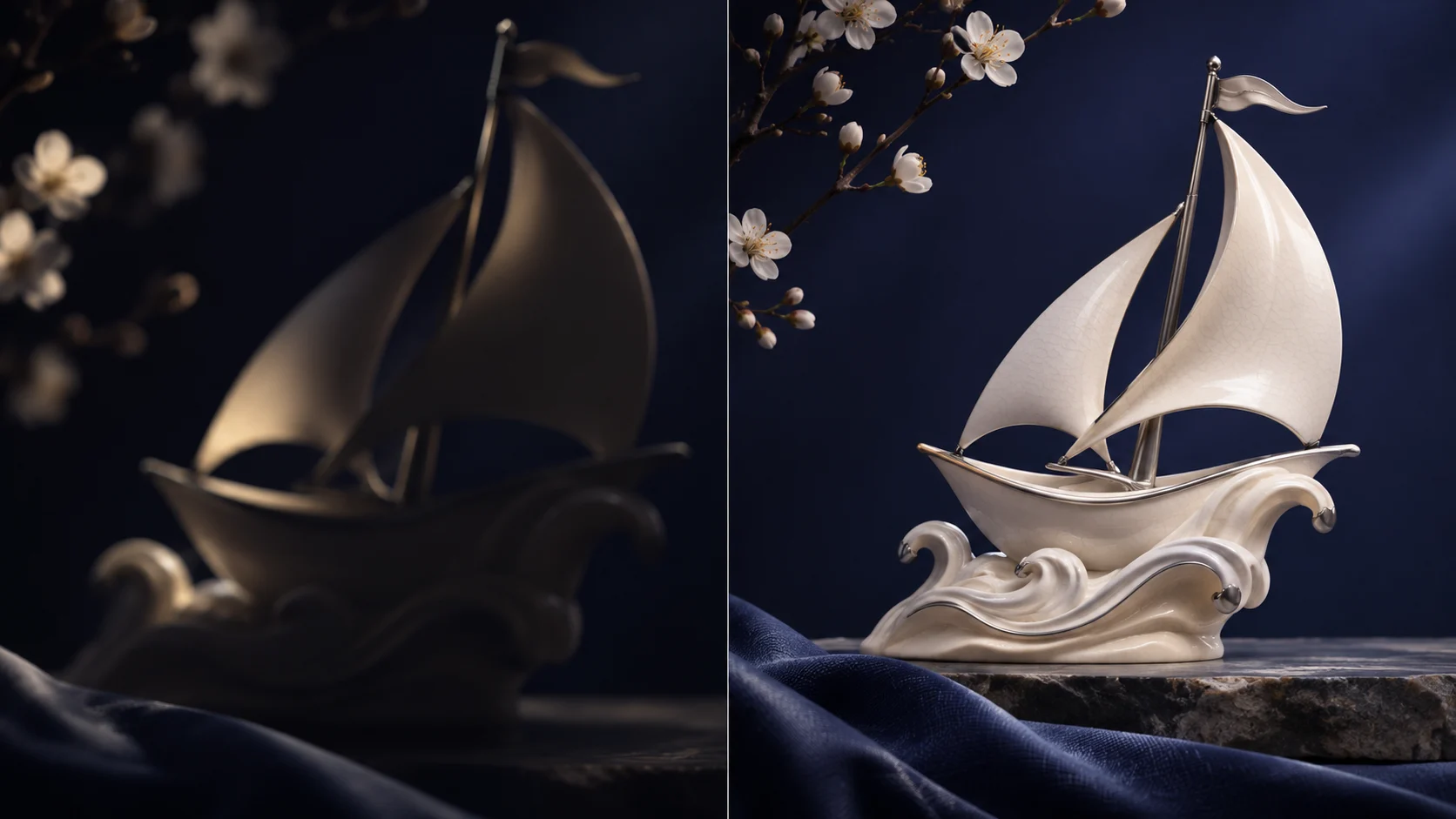
Start with one honest promise
Imagine a fictional maker presenting a porcelain sailing sculpture. One frame shows an attractive but unrecognisable shadow; another reveals the object beside a hand. The shadow may belong beautifully inside the film, where movement explains it. The second image may work better as an invitation because a new viewer can identify what they will see. Neither choice has a proven click advantage in this example.
Write a sentence next to each candidate: “You will see how this object changes in the light.” If the film actually delivers that experience, the promise fits. “A secret that changes everything” would ask the same modest film to satisfy a much larger claim. A poster can create curiosity without pretending there is a reveal, a result or a customer story that the film does not contain.
Try the crop before choosing the frame
Use this local worksheet with your own project. The starting values are an illustrative example.
Your working note
This worksheet runs in your browser. It sends no form entries to the server and does not save them after reload. Download a copy before leaving.
Complete every text field and keep numbers inside the stated limits.
Compare at the size people will meet it
Open three candidates at a small size before studying them full screen. Can you still recognise the subject? Does a face remain readable? Is the one important object distinguishable from its background? Check the image with nearby page text rather than on an empty design canvas. A quiet frame can become useful when a precise headline does part of the explanation.
The crop tool below changes the viewing window on an original illustrative image. Move the focal point and switch between a wide card and a square. Watch what disappears at the edges. It is an editorial rehearsal, not a simulation of every platform’s crop. You will still need to upload the actual export, check the real preview and keep essential detail away from vulnerable edges.
| Question | Useful sign | Reason to try another frame |
|---|---|---|
| Can I identify the subject? | One recognisable object | Only motion would explain it |
| Does it match the film? | The promised moment appears | The image suggests another story |
| Does the crop survive? | Important detail remains | Face or product is cut away |
From a frame to an invitation
Use the buttons or the left and right arrow keys to follow the sequence.
Scene 1 / 3
Recognise
Identify the subject without relying on motion.
How to put an AI film on your website without making visitors wait
Treat words as part of the same invitation
If the page already gives the film a title, another long sentence inside the image may be unnecessary. A social card has a different context, but small lettering can still turn an elegant picture into a poster nobody can read. Try the image without words first, then add only the words that genuinely change a person’s understanding. Keep any brand lettering in a controlled design layer.
I would preserve a clean version without text alongside the designed social cover. They serve different placements and future translations. Replacing a poster image does not change the first frame of the video itself, and an uploaded thumbnail does not guarantee that every messaging app or social network will show it. Record the destination, export dimensions and date of the preview check.
Approve a pair, then test a real question
For the fictional sculpture, I might keep the clear object frame as the main candidate and the shadow frame as an alternative. Everything around them should stay the same if the later question is about the image: title, description, destination and audience. If several things change, record that you compared complete invitations rather than proving which individual frame caused the difference.
For SOLONSKY Films, a useful approval note would name the chosen still, its permitted crops, any words that must stay readable and where it will appear. Include the clean source image and the final exports. After publication, distinguish a missing preview from an unpopular one. A broken card needs a delivery fix; low response needs enough real observations before making an editorial conclusion.
- Describe the promise in one sentence
- Compare a few genuine candidates at small size
- Keep the focal point safe in the final crop
- Check the uploaded preview before comparing response
Pause the film and choose your invitation
Use The Impossible Brief as a viewing exercise. Pause on different moments and compare what a single still explains. The interactive image is a separate generated illustration, not a frame extracted from this film.
The video provider connects only when you press play. Watch on YouTube.
Questions
Should the poster always be the first frame?
No. The poster represents the film before playback. It can be another truthful frame, while the opening still needs to work on its own.